
ChatGPT Business Hub is OpenAI’s new tool that lets a business claim its own profile inside ChatGPT, add a short description and a catalog of products or services, and set up a branded agent that answers customer questions. OpenAI introduced it on November 10, 2026. We set up the Reachd profile right away, so everything below comes from the announcement and from going through the screens ourselves.
It’s worth the time, and it works best together with Reachd. Business Hub is where you tell ChatGPT about your business in your own words. With Reachd your business becomes the one ChatGPT recommends first when a customer asks for the best option in your category.
What ChatGPT Business Hub gives a business
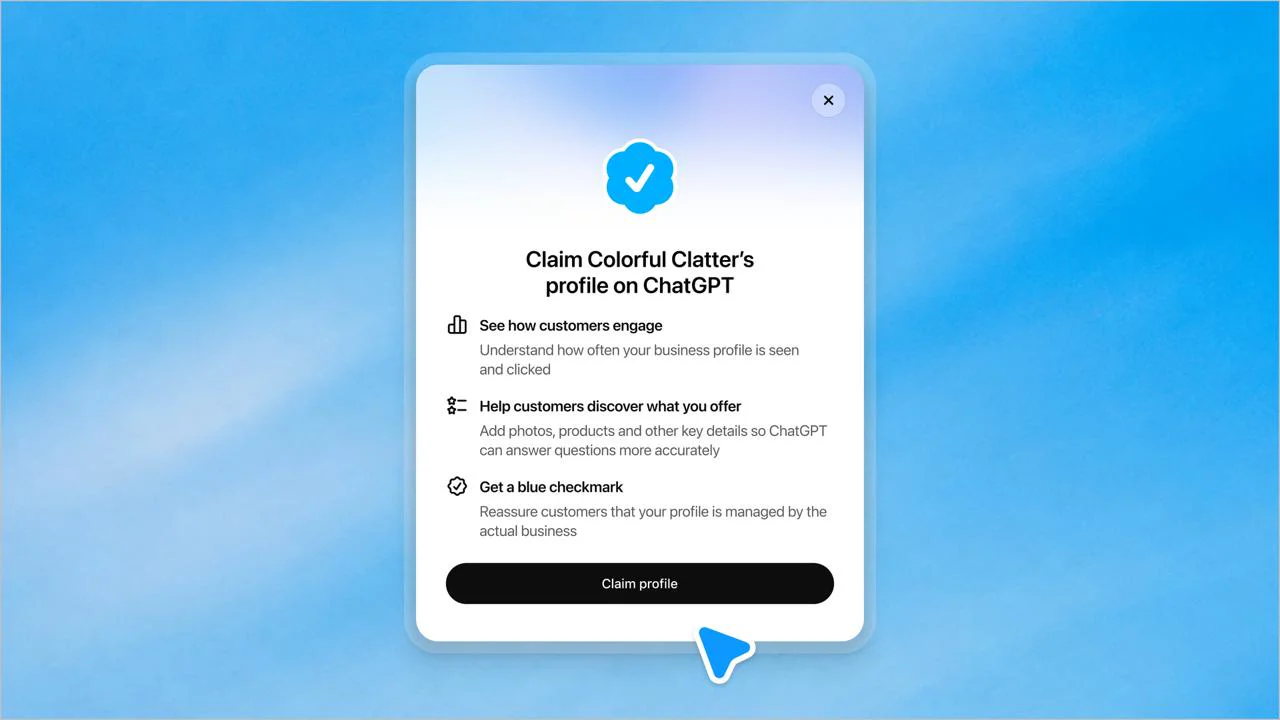
Here is what a business gets there.
- A profile with your category and a short description that ChatGPT can share in conversations when it’s relevant.
- A catalog of products or services that can appear right in ChatGPT’s answers when they match what someone is looking for, and in a side panel about your business.
- A business agent, a chat with your name and colors that answers customers from the information you give it.
- A blue checkmark that shows customers the profile is managed by the actual business.
- Insights on how people engage with you in ChatGPT, the number of mentions, website clicks and discovery topics, the common themes of conversations where your website is cited. They are aggregated, show up only once there are enough conversations, and the conversations themselves stay private.
Think of it as ChatGPT’s counterpart to a Google Business Profile. We explained earlier why a Google Maps profile alone is not enough to get recommended by AI.
How to claim your business in ChatGPT, step by step
- Go to chatgpt.com/business-hub and search for your business name. Claim the listing if ChatGPT already has one, or create a new one. Shopify merchants can connect their store right there or from the Shopify admin to speed up verification.
- Verify the business. Domain verification works through a TXT record in your DNS, the same kind of record many owners already added for Google Search Console, so have access to your domain settings at hand.
- Pass the ID check with a government-issued ID. Until it’s done, the profile stays locked for editing and the agent can’t go live.
- Pick a category and write the description.
- Upload the catalog and set up the agent.
Most of this takes a few minutes. The description and the catalog are where it pays to slow down.
Writing the description ChatGPT will repeat to customers
The “More about your business” box fits roughly 300 characters, about a sentence and a half. Whatever you put there can reach customers word for word, so every phrase should answer something people ask before they buy.
For a New York luxury florist we work with, the facts that matter are same-day delivery, the area it covers, Sunday hours and the photo of the bouquet before it ships, because that’s what people ask ChatGPT when they order flowers:
Luxury florist on the Upper East Side with same-day flower delivery across all five NYC boroughs on orders by 3 PM, open seven days a week, and a photo of your exact arrangement sent before it leaves the studio.
Slogans and “best in town” take the same space and give ChatGPT nothing it can use in an answer. Concrete facts like a neighborhood, a license number or a starting price are what it can repeat.
The ChatGPT Business Hub catalog, list what people search for
The catalog is a file in OpenAI’s product feed format: CSV, TSV, JSONL or Parquet, up to 20 MB. Each row needs item_id, title, description, url, brand, seller_name, image_url, availability and price. Price goes in as “99.00 USD”, availability as “in_stock”, and the url has to be a full https link on the domain you verified.
The bigger question is what goes in it. Our first draft for Reachd was our pricing plans, and we dropped it fast. People ask ChatGPT for a way to get their business recommended or for a tool for their agency’s clients, and a “Pro plan” matches none of that. So the Reachd catalog lists Reachd for business owners, for online stores and brands, for marketing agencies, and the free analysis.
A service business can do the same. A moving company gets more from “condo moves with elevator booking”, “long-distance moves” and “climate-controlled storage” than from “Package B”.
Setting up the ChatGPT business agent
Customers reach the agent from your ChatGPT profile. When your business shows up in an answer, people can click through to the profile and start a separate, clearly labeled conversation with the agent to compare options and ask follow-up questions.
The agent has a name, a header color, a tagline, conversation starters, instructions and business info. ChatGPT drafts all of it from your website, and the draft is worth rewriting line by line. Ours described Reachd in old wording that had stayed somewhere on the site.
Write the starters as the questions your customers really ask, like “How can my business become the one ChatGPT recommends first?” In the instructions, say who the agent talks to and how plainly it should speak. We also kept a rule that the agent never promises a specific result.
Does ChatGPT Business Hub help you get recommended?
A profile tells ChatGPT what you offer. Who it recommends first is a separate question, and we see the answer every day in our data. When someone asks for the best mover in Miami or a swim school for a toddler, the answer comes from the business’s own pages and from what other sites say about it, and the profile is one more voice in that picture. We described both routes into ChatGPT’s answers in two ways to get recommended by ChatGPT.
That’s the part Reachd is built for. It’s the only AI visibility tool built for business owners who have no time for keywords, prompts or reports. You become the #1 business ChatGPT, Google and other AI recommend in your category, get ahead of competitors and win new customers from AI search. If you’ve wondered why ChatGPT doesn’t recommend your business yet, the reasons are almost always on your site and on a few pages about you, and the profile alone leaves them as they are.
Find out for free whether ChatGPT recommends your business
The first Reachd analysis is free and needs no card. You’ll see how ChatGPT answers your customers’ questions today, which competitors it names first and the first change that moves your business up. Check whether ChatGPT recommends your business and fill in Business Hub with the facts that actually win.
Frequently Asked Questions
What do I need before setting up ChatGPT Business Hub?
A government-issued ID, access to your domain's DNS settings, a description of about 300 characters, and a list of your products or services with prices and page links for the catalog.
Is ChatGPT Business Hub the same as ChatGPT Business?
They are different products. ChatGPT Business is the workplace subscription teams use internally, and Business Hub controls how your business appears to customers inside ChatGPT.
How is it different from a Google Business Profile?
A Google Business Profile feeds Maps and local search, and ChatGPT reads it only as one of many sources. Business Hub talks to ChatGPT directly. We explain why a Google Maps profile alone is not enough for AI recommendations.
Can a business outside the US claim a profile?
According to OpenAI, any eligible business located where ChatGPT is available can claim its business through Business Hub.
Can I advertise my business agent in ChatGPT?
Yes, a business can sponsor its agent and use it as the destination for ChatGPT Ads. Sponsored placements are labeled and kept separate from ChatGPT's own answers.