
Every AI visibility platform gives you a dashboard. The problem is that your agency already has one.
Ten clients turn into ten tabs of a vendor’s interface, while the report that actually goes to the client is built in your own template, next to SEO and paid numbers. So every Monday somebody exports CSVs, reformats columns, and pastes charts into a deck. That hour never lands on an invoice.
Exportability is one of the sharper differences between tools in this category, and it rarely shows up on a feature page. When we compared nine AI visibility tools, the products with serious integrations kept them in the enterprise bracket, where the subscription starts around $400 a month. If the data describes your clients, moving it into your own systems should not be a pricing tier.
Reachd took the opposite position. The full read-only REST API ships with every workspace, on every plan, including agency plans. The central place for managing client data becomes your analytics stack, your CRM, or your client portal, and the vendor dashboard becomes optional.
What the Reachd API returns
The API is a read-only JSON layer over everything Reachd tracks across ChatGPT, Google AI, Perplexity, Claude, and Grok. Authentication is a bearer key scoped to one workspace, with 5,000 requests per day per key. Every endpoint answers to GET and cannot modify anything, so a leaked key reads data and does nothing else.
One call lists every client business in the workspace. The ids from that list feed all other endpoints, so a loop over clients is a loop over ids. For agencies that is the whole trick. The same script that builds a report for one client builds it for twenty.
| Data | Endpoint | What agencies use it for |
|---|---|---|
| Client list | /businesses | Iterate over every client business and location in one workspace |
| Visibility score | /businesses/{id}/visibility | The headline number per client, with top competitors and the last analysis date |
| Score history | /businesses/{id}/visibility-history | Trend charts for monthly reports, day by day, with competitor scores per point |
| Competitor standings | /businesses/{id}/competitors | Score, average position inside AI answers, and mention counts per tracked competitor |
| Query performance | /businesses/{id}/query-performance | Customer queries grouped into winning, vulnerable, and lost |
| Monitored queries | /businesses/{id}/customer-queries | What customers actually ask AI in the client’s category |
| AI facts | /businesses/{id}/ai-facts | What each assistant knows about the client, and the knowledge gaps |
| Placements | /businesses/{id}/placements | Directories worth getting listed on, ranked by impact |
| Retail channels | /businesses/{id}/channels | For product clients, the shops AI names as places to buy in the category |
| Competitor quotes | /businesses/{id}/competitor-quotes | The exact phrases AI quotes about a competitor |
| Insights | /businesses/{id}/insights | Dated action items with expected impact, ready for a client-facing plan |
Multi-location clients pass a location parameter and get the same data per city or country. Full request and response schemas live in the interactive reference, generated from the live API, and the raw OpenAPI spec works with any client generator. Everything above is included in the subscription, with no API tier and no per-call pricing.
A marketer wired it into her own dashboard in 30 minutes
Svetlana runs employer branding at a fintech company hiring engineers in Cyprus and Poland. Her competition in AI answers is not small. When engineers ask ChatGPT where to work in Cyprus, the same names keep coming back, Exness, FxPro, BrainRocket, XM, and international brands like Revolut.
She already had her own dashboard, built with Claude Code, where hiring and brand metrics lived. One more browser tab to check every morning was the thing she did not want.
So she took a Reachd API key and added the data to the dashboard she already had. It came out as two blocks. A score bar chart puts her company against every tracked competitor, with toggles for Cyprus and Poland. Below it, a competitor table with each company’s score, average position inside AI answers, and mention counts across assistants.
From key to working charts took about half an hour.
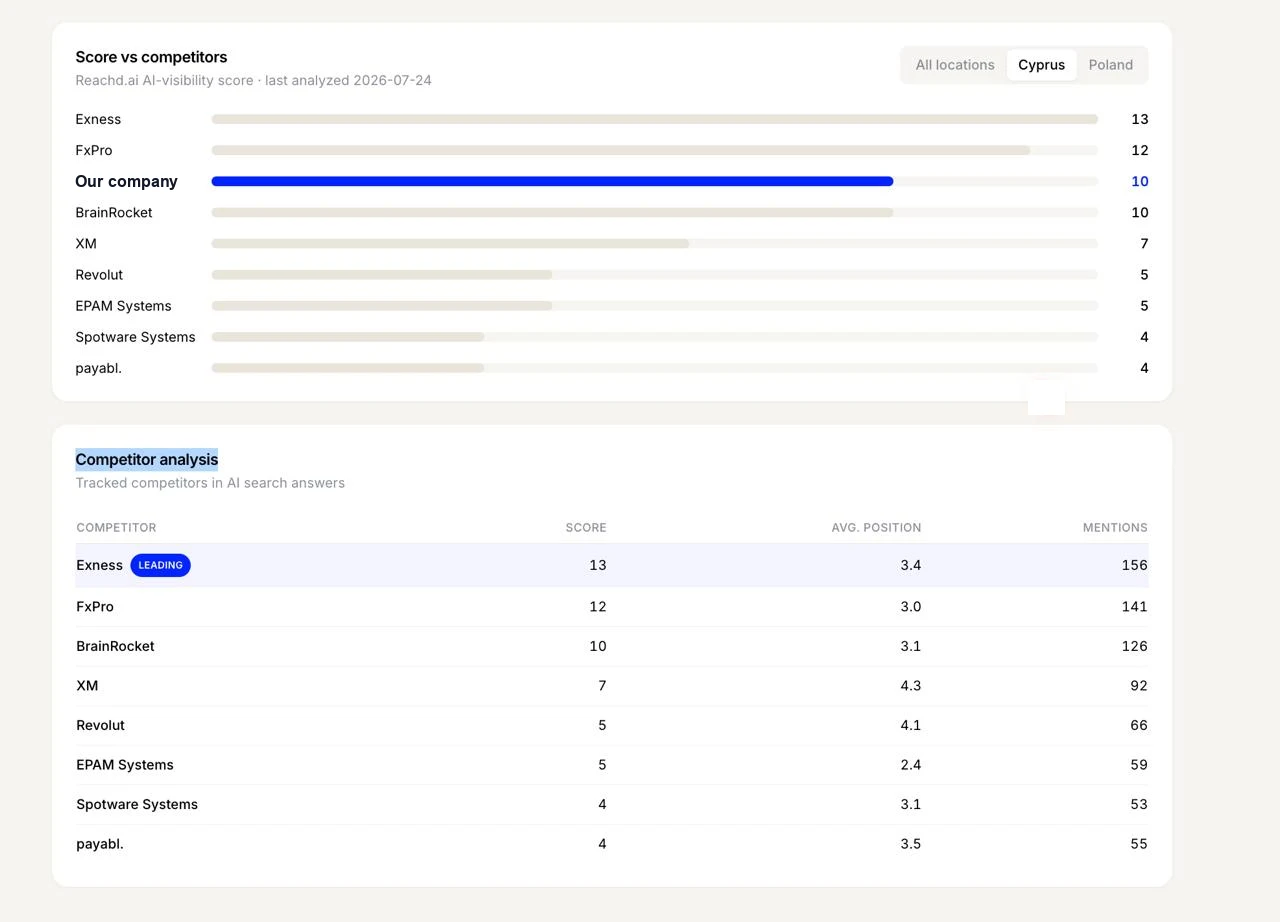
The company name is hidden in the screenshot at her request. Everything else is her live data, on a dashboard that was never designed for Reachd numbers.
Now scale that thought. She is one marketer with one company to track. An agency running ten client workspaces reuses the same integration ten times, because the shape of the response is identical for every business. The second client costs minutes.
Three ways to connect it
The right destination for AI visibility data is wherever the team already looks every day. Three routes cover almost every agency setup.
Google Sheets and Looker Studio
The fastest path for client-facing reports. A small script calls the API on a schedule, writes one row per client with visibility score, leading competitor, and week-on-week change, and Looker Studio reads the sheet. Conditional formatting flags any client whose score dropped, and the Monday report is ready before anyone opens a laptop.
This route needs no infrastructure. A Google Apps Script with a time trigger is enough, and any AI coding assistant will write it from a plain-language description of the layout you want.
Your CRM or BI stack
Agencies that report through HubSpot dashboards, Tableau, Power BI, or a warehouse pull the JSON straight in. The API is read-only with stable schemas, so it behaves like any other source in the pipeline. AI visibility lands next to traffic, leads, and revenue, which is where it becomes defensible in a client meeting. A visibility score on its own is a curiosity. The same score sitting next to the client’s demo requests turns into an argument.
This is also the route for white-label reporting. The data arrives raw, so the report carries your agency’s brand, your template, your narrative.
MCP, when you want answers instead of pipelines
Not every question deserves a pipeline. Sometimes an account manager needs to know what changed for a client this week, five minutes before the call.
Reachd also ships an MCP server that connects the same data to Claude and other MCP-compatible assistants. Ask in plain language, get the analysis back. A prompt an agency can steal today:
For each business in my workspace, compare this week’s visibility score to last week. List every client whose score dropped, name the competitor that gained the most, and draft one paragraph per client explaining what likely changed, in language I can paste into a client email.
The assistant pulls the data, compares the periods, and writes the summary. Other MCP workflows follow the same shape.
API or MCP, which one you need
Same data, different consumer. That is the whole distinction.
The REST API serves code. Choose it when the output has to appear on a schedule, in the same format every time, in a system other people check. Recurring client reports, BI dashboards, CRM records, anything that runs without a human pressing a button.
MCP serves conversation. Choose it when the question is ad hoc, exploratory, or ends in prose. Pre-call briefings, anomaly digging, drafting client updates.
Most agencies end up with both, and that is the intended design. The pipeline keeps the dashboards current, and the assistant answers everything the dashboard was never built to show.
Start with one client
Take one client, pull the visibility endpoint, and put the number where your team already looks. If it earns its place there, the other nine are a loop.
The API reference has the endpoints, the agency page has how the rest of the workflow fits together, and client cases show what comes out the other end.
Frequently Asked Questions
Does Reachd have an API for AI visibility data?
Yes. Reachd provides a read-only REST API covering visibility scores, score history, competitors, query performance, AI facts, placements, and action-item insights for every business in a workspace. It is included with every plan at no extra cost, and the developers page covers authentication, endpoints, and how to get a key.
Can an agency pull AI visibility data for all clients at once?
Yes. One endpoint lists every client business in the workspace, and each id feeds every other endpoint. A single script loops over all clients, so per-client reporting scales without extra integration work.
Can I export AI visibility data to Looker Studio, Google Sheets, or a CRM?
Yes. The API returns stable JSON over standard GET requests, so it connects to Google Sheets through Apps Script, to Looker Studio through a Sheets bridge, and to any CRM or BI tool that ingests JSON, including HubSpot, Tableau, and Power BI.
What is the difference between the Reachd API and the Reachd MCP server?
They expose the same data to different consumers. The REST API serves code, dashboards, BI tools, and scheduled exports. The MCP server connects AI assistants like Claude for plain-language questions and on-demand analysis. Both are read-only and included with paid plans.
Is the API safe to hand to a contractor or a script?
Every endpoint is read-only. A key reads the visibility data of its own workspace and cannot touch businesses, settings, or billing. Reachd stores only a hash of the key, and a compromised key can be revoked without affecting the rest of the account.